
For JK (Jikong) boards
A simple app for your JK BMS
JK boards sit inside many South African lithium batteries: DIY 48 V home banks next to Sunsynk and Deye inverters, and 12 V and 24 V packs in bakkies, caravans and boats. JK’s own app can do a lot, including changing settings. CellBoss does one job: it shows what your JK board sees, clearly, and never changes a thing.
CellBoss is in testing on Google Play now. Want to try it sooner with your own battery? Email us.
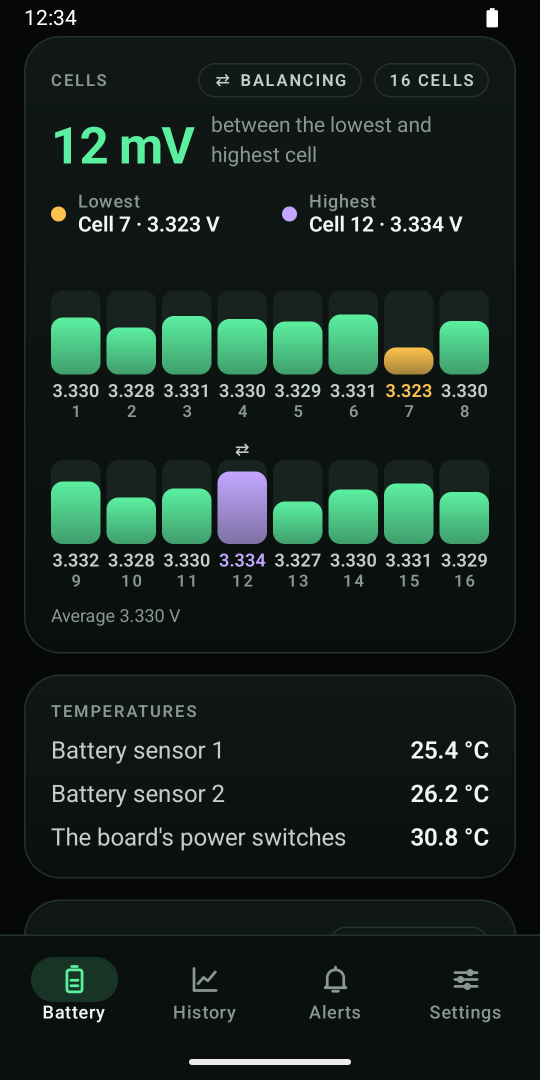
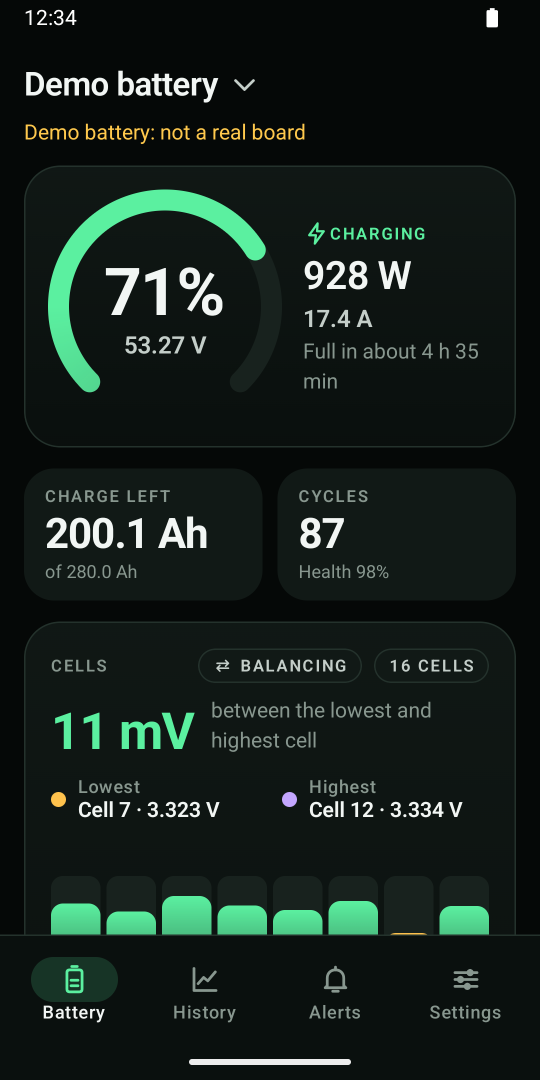
What you see from your JK board
- The charge in percent, the voltage, the current and the power going in or out.
- Time to full or empty at the current charge or load.
- Every cell’s voltage, with the lowest and highest marked and the difference between them in millivolts.
- Balancing: whether JK’s balancer is working right now.
- Temperatures: the battery’s sensors and the board’s power switches (the MOSFETs).
- The board’s alarms in plain words, and its charge and discharge switches, shown and never changed.
- Charge left and cycles: amp-hours left of the capacity, and the charge cycles so far.
Why read-only matters with a JK board
JK boards are powerful. Their settings decide the cell voltage limits, the currents and the balancing. One wrong number can damage a pack or stop your house from getting power. CellBoss can’t change any of them, so anyone can check the battery without risk.
Installers: give your customers CellBoss. They see their battery, every cell included, and they can’t touch your settings.
JK BMS with a Sunsynk or Deye inverter
Your inverter reads the JK board over CAN or RS485 and shows the charge. It doesn’t show you each cell. CellBoss reads the same board over Bluetooth and adds every cell’s voltage, the difference between them and the balancing. It leaves the board’s link to your inverter alone.
That’s how you spot a cell that drifts away from the rest before it trips the battery during load shedding.
How to connect CellBoss to a JK BMS
- Close JK’s app first. A JK board talks to one phone at a time.
- Open CellBoss near the battery and tap Pair a battery.
- Pick your board in Android’s list. JK boards’ names start with JK- or JK_, for example JK-B2A24S15P.
- Name the battery and give its capacity. CellBoss shows it straight away.
Which JK boards?
JK smart BMS boards with Bluetooth, on older and newer firmware: JK changed how its boards send their data, and CellBoss reads both kinds. CellBoss is new. If your board reads oddly, use Send a data sample in the app and we’ll fix it.
JK’s app or CellBoss?
Use JK’s app to set up the board. Use CellBoss to check on the battery every day: one clean screen, every cell, no settings to bump, no ads, and no internet needed.
JK BMS app questions
Is CellBoss JK’s official app?
No. CellBoss is made by Kindly Made and isn’t affiliated with JK (Jikong). It reads JK boards over Bluetooth, the same way JK’s app does, but it only reads.
Can CellBoss change my JK BMS settings?
No. CellBoss never changes a setting, a switch or a calibration on your board. Use JK’s app or your installer for that.
Why can’t CellBoss find my JK board?
Close JK’s app (the board talks to one phone at a time), stand closer to the battery, and check that Bluetooth is on. In a metal cabinet the range drops a lot.
Does it show all 16 cells of my 48 V bank?
Yes. CellBoss shows every cell the board reports, whether that’s 4, 8, 16 or more.
Can I see two JK batteries in parallel together?
Yes, with Pro: the bank view adds them up and shows which battery’s cells are furthest apart.
Check your JK battery the easy way
Every cell on one screen. Read-only, so nothing gets changed by accident.
CellBoss is in testing on Google Play now. Want to try it sooner with your own battery? Email us.